
1 Introduction
The Epicode iraCPA allows users to do call progress analysis for their dialer applications. With these API one can:
Determine if a call is answered by an answering machine, live voice or fax machine.
Listen to specific frequency tones like beeps from an answering machine.
Stop the analysis upon receiving one of these events.
Each API is a json body request over a websocket connection. The following sections describe the json request and response, and how to send the RTP data.
2 Detection Mechanism
Epicode’s iraCPA works by analyzing the speech pattern of the voice. There is no objective way to separate an answering machine greeting from a live voice, unless a pure tone (single frequency) is detected. Therefore a collection of methods are used, and whichever method scores a strike within the time limit determines if the voice is live or a recording.
IraCPA promises to determine the AMD result in mere 1750 milliseconds. This is very important to meet the compliance requirements from TCPA or PECR. This is not offered by competitors of iraCPA, they just let the customers pick the timeout and other tuning values. Meanwhile, iraCPA engine comes pre-tuned to deliver best possible determination within 1750 milliseconds.
iraCPA is language agnostic. It doesn’t depend on the callee saying Hello in any language. It only looks at the speech pattern and energy density that matches either a recording greeting or live voice. The pattern recognition logic is proprietary. This is a stochastic algorithm and not a deterministic one. The accuracy is consistently above 80%, however we have heard customers reporting above 90% in some installations.
iraCPA also looks for pure tone that indicates non-human source. Human voice is a collection of harmonic frequencies, each of low energy. A pure tone will have very high energy in comparison to other harmonic frequencies. If a pure tone is detected, live voice can be ruled out. The iraCPA can be configured to match the pure tone frequency to known tones from different voicemail providers and fax devices. This only works if the tone is present in the initial 1750 milliseconds.
iraCPA also detects perfect/ambient silence and has tuning parameters to ignore the initial silence. In addition, it can detect ambient silence beyond the initial 1750ms, and can send silence detection events. If the called party is silent for the entire 1750ms, it is interpreted as a live voice, since answering machines usually respond by that time.
3 Deployment Architecture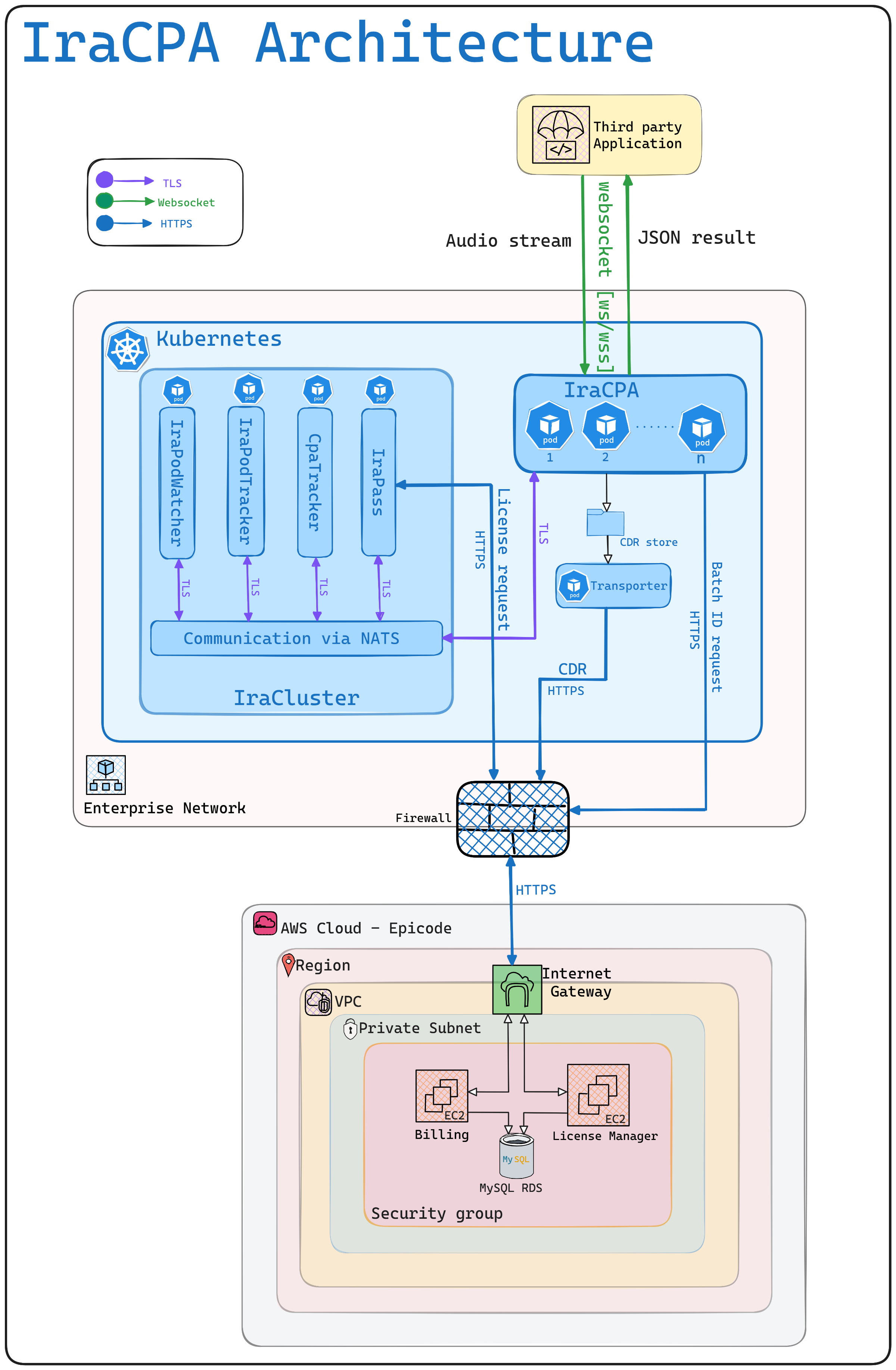
The deployment for IraCpa consists of 3 parts, namely IraCluster, Epicode Cloud and IraCpa application Instances. The IraCluster is deployed in Kubernetes, while IraCpa instances could be deployed in Kubernetes or in Linux servers directly. The Billing and Licensing modules are installed in Epicode’s AWS cloud.
3.1 IraCluster
IraCluster is an application layer orchestration framework for achieving load balancing and redundancy in distributed application development. IraCluster can reside either in cloud or in an on-premise LAN. It primarily provides these following features:
Provide a SQLite based embedded transient distributed database named TDB for sharing data between all applications running in the cluster.
Enable load balancing for distributed stateful applications, where the state information cannot persist in the database. The typical scenario would be voice and video call applications where an ongoing session cannot switch servers during the session. The state belongs to a server and all actions related to that session must be handled by the server that owns the session. IraCluster achieves this in conjunction with load balancing and redundancy.
Seamlessly and securely communicate between various applications spread across LAN/WAN using sub/pub pattern, while the application instances could be joining and leaving without affecting the operations.
Applications will be able to interact with other applications in the same IraCluster by name or by instance ID. It is achieved via IraCluster service discovery. One can run multiple IraClusters within a single Kubernetes cluster by using different IraCluster names as a namespace.
IraCluster has 4 essential components as described in the following sections.
3.1.1 NATS
NATS is a well known CNCF Open Source Messaging platform. IraCluster requires a NATS deployment running on the Kubernetes, secured via NKEYS.
3.1.2 IraPodTracker
IraPodTracker monitors all the IraCluster members. As the members join and leave, it will update the record for them in the TDB database, and also send a join/leave message to every member of the IraCluster. At least one copy should be running at any time in the Kubernetes cluster. Users will never interact directly with this component.
3.1.3 IraPodWatcher
IraPodWatcher primarily does garbage collection when members leave the cluster. Users will never interact directly with this component. At least one copy should be running at any time.
3.1.4 IraPass
IraPass is the floating license manager developed by Epicode. It allows multiple instances of IraCluster based applications to share a common pool of licenses.
3.1.4 CPATracker
CPATracker tracks all the running IraCPA instances. It will track if any new IraCPA instance joins the cluster and if any IraCPA instance leaves the cluster. CPATracker exists merely to coordinate load balancing between IraCpa instances. Users will never interact directly with this component. At least one copy should be running at any time.
3.2 Transporter
Transporter sends IraCPA CDR over HTTPS to the billing.epicode.in The CDR directory is scanned every minute and each file is brotli compressed and sent to the billing server. CDR contents are base64 encoded and can be decoded to see the content that is being sent
3.3 Epicode Cloud
Epicode cloud controls the concurrent licenses. In case of usage based billing, IraCpa will generate CDR for each transaction, and it will be uploaded to Epicode cloud for monthly billing purposes. No proprietary information will be part of this CDR.
The license token gets renewed by IraPass every 10 days automatically, by synchronizing with license.epicode.in website. The license token has a lifetime of 20 days. If synchronization fails, there will be 10 days to fix the connectivity issue.
3.4 IraCpa Instances
IraCpa can run in standalone or load-distributed mode, as either kubernetes deployment or as a service in Linux server. Many popular Linux distributions are supported.
4 API Interface
The API interface is over a websocket connection. The API caller just needs to know the IP address and the port number to connect to the iraCPA service. The url would be wss://IP_ADDRESS:PORT. The deployment can contain multiple server instances or multiple pods on Kubernetes, using the IraCluster HA framework from Epicode.
4.1 Set CPA Parameters
This API allows configuration of the various parameters which controls the behavior of the call progress analysis engine. Some prominent configurations that can be set are:
Time limit for first detection, that LV or AM.
The specific frequencies to detect other than identifying humans and answering machines.
The detection event on which the CPA engine can stop the analysis.
Total analysis time limit.
4.1.1 Request Body (json)
Use text mode in the websocket to send this json request. Keep listening to any replies asynchronously. The json schema is as follows:
{
"$schema": "http://json-schema.org/draft-04/schema#",
"type": "object",
"properties": {
"request_name": {"type": "string" },
"tenant_id": {"type": "string" },
"config_name": {"type": "string" },
"analysis": {"type": "string", "enum":["amd"]},
"min_ambient_energy": {"type": "integer", "minimum": 100},
"initial_silence_ignore": {"type": "integer", "minimum": 0, "maximum": 5000},
"log_rtp_history": {"type": "boolean", "enum" : [true,false] },
"tones": {"type": "object"},
"log_voice": {"type": "boolean", "enum" : [true,false] },
"break_events": {"type": "string"},
"amd_time_limit": {"type": "integer", "minimum": 1000, "maximum": 3000},
"total_timeout": {"type": "integer", "minimum": 10000},
"silence_detect_limit": {"type": "integer", "minimum": 1000, "maximum": 10000},
"beep_to_silence_gap": {"type": "integer", "minimum": 0, "maximum": 10000},
"beep_is_am": {"type": "boolean", "enum" : [true,false] },
""energy_lwm": {"type": "integer", "minimum": 100},
"detect_dtmf": {"type": "boolean", "enum" : [true,false] }
},
"required": [ "request_name", "config_name", "tenant_id", "analysis"]
}
Key |
Description |
Example |
Default |
|
request_name REQUIRED | string |
Specify the request name |
set_cpa_params |
None |
|
tenant_id REQUIRED | string |
Name of the licensee |
acme |
None |
|
config_name REQUIRED | string |
Unique name for the configuration |
“my_setup” |
None |
analysis |
Name of the call progress analysis |
amd |
None |
|
min_ambient_energy integer |
Threshold that separates perfect initial silence and ambient silence |
200 |
200 |
|
initial_silence_ignore integer |
If the energy level is lower than minimum ambient energy, ignore the RTP packets for a duration (in millisecs) |
5000 |
750 |
|
log_rtp_history bool |
Log the history of rtp packets sent. Must be one of true, false |
true |
false |
|
tones object(key, value pairs) |
This is optional, any beeps will emit BP by default. Tones are specified as frequency and tolerance. |
{"FX" : "2100|5", "MD" : "1662|5"} |
{} |
|
log_voice bool |
Tells the system whether or not to record and store the analysis stream. Must be one of true, false |
true |
false |
|
break_events string |
Comma separated list of frequencies or events on which the CPA analysis can stop. |
“LV,FX,AM” |
None |
amd_time_limit |
The time limit for determining the voice to be AM or LV. |
2000 |
1750 |
|
total_timeout integer |
The time in milliseconds at which the analysis will stop. |
20000 |
15000 |
|
silence_detect_limit integer |
Detect silence after initial AM/LV detection. Sends SL after the detect limit. Set 0 for no detection. Minimum value 1000 and maximum value is 10000, in milliseconds. |
3000 |
2000 |
|
beep_to_silence_gap integer |
Detect if silence follows a beep after a certain gap, specified in milliseconds. This emits BPSL event upon detection. Default is 0, then it won’t detect. |
1500 |
0 |
|
beep_is_am bool |
Consider any beep before the AM/LV event as AM. |
false |
true |
|
detect_dtmf integer |
Detect DTMF |
true |
false |
|
suppress_spikes bool |
Suppress sharp noises |
false |
true |
|
minimum_frequency integer |
Lowest frequency to be detected |
400 |
250 |
4.2 Sample Request (json)
{ |
4.3 Response Body (json)
Field |
Description |
|
result string |
OK - No error 01 - Mandatory fields are not specified 02 - Could not save the CPA configuration |
|
reason string |
Will provide the descriptive message about the result |
If the cpa parameter is set in one instance, it will take effect in every instance in the iraCluster. You can set the cpa_parameter using one instance, and use config_name on the other instances.
4.4 Make CPA request
This API sends the CPA request, followed by the RTP data.
4.5 Request Body (json)
Use text mode in the websocket to send this json request. Keep listening to any replies asynchronously.
Key |
Description |
Example |
Default |
|
tenant_id REQUIRED | string |
Name of the licensee |
acme |
None |
|
config_name REQUIRED | string |
Unique name for the configuration |
“my_setup” |
None |
|
sampling_rate OPTIONAL | integer |
Sampling rate of the audio |
16000 |
8000 |
|
call_uuid OPTIONAL | string |
Call_uuid to be associated with the transaction |
Generated |
|
|
pod_id OPTIONAL | string |
Calling application instance |
None |
4.6 Sample Request (json)
{ |
This API request will initialize the CPA analyser. After the request is sent, the websocket mode should be changed to binary, and RTP data should be sent in 16 bit PCM format. Preferably send 4000bytes every 250milliseconds. The results will be coming back whenever the CPA analyser makes a detection.
4.7 Response Body (json)
Field |
Description |
|
result string |
LV - Live voice found AM - Answering Machine found TO - Time out, total time exceeded The result could also be a custom tone specified under tones. 01 - Mandatory fields are not specified 03 - Specified CPA configuration not found 04 - No license available for the tenant 05 - Specified CPA analyzer not found 06 - RTP data was sent without initializing the analyser |
|
reason string |
Will provide the descriptive message about the result. |
|
break bool |
true/false - Tells the caller to stop sending RTP and disconnect the session. |
|
max_energy Integer |
The maximum energy found in the voice data. |
|
pattern string |
Energy pattern seen in the voice data. |
|
duration Integer |
Duration of the data analyzed. |
|
request_count Integer |
Count of the requests handled so far. |
|
real_time Integer |
It is the time taken to send the audio to IraCpa for Analysis |